有关p5.js的学习

课程基本信息

  • 课程名称:原型控制与交互2
  • 指导老师:沈丹妮老师
  • 助教:周龙飞
  • 课程时间:2019-2020学年 第二学期 5-8周

课程作业分享1——“少去人多的地方”(游戏设计)

作业展示

成果请看:http://zstu-interaction.art/?p=3307
目的:人们想要避开病毒,但是病毒却是防不胜防的。戴口罩是一个办法,但是不同口罩保护的时效也是不同的。正如游戏所设置的那样,寻找病毒之间空间大的地方是关键,病毒越是密集,感染的风险越高,并且游戏界面越小,失败的可能性越大,所以我们要做的就是尽量避开人群去宽敞的空间。

操作:鼠标控制紫色的点,避开红蓝病毒点,得到黄色方块口罩就可能会有一段时间的保护。

代码分享
1
2
3
4
5
6
7
8
9
10
11
12
13
14
15
16
17
18
19
20
21
22
23
24
25
26
27
28
29
30
31
32
33
34
35
36
37
38
39
40
41
42
43
44
45
46
47
48
49
50
51
52
53
54
55
56
57
58
59
60
61
62
63
64
65
66
67
68
69
70
71
72
73
74
75
76
77
78
79
80
81
82
83
84
85
86
87
88
89
90
91
92
93
94
95
96
97
98
99
100
101
102
103
104
105
106
107
108
109
110
111
112
113
114
115
116
117
118
119
120
121
122
123
124
125
126
127
128
129
130
131
132
133
134
135
136
137
138
139
140
141
142
143
144
145
146
147
148
149
150
151
152
153
154
155
156
157
158
159
160
161
162
163
164
165
166
167
168
169
170
171
172
173
174
175
176
177
178
179
180
181
182
183
184
185
186
187
188
189
190
191
192
193
194
195
196
197
198
199
200
201
202
203
204
205
206
207
208
209
210
211
212
213
214
215
216
217
218
219
220
221
222
223
224
225
226
227
228
229
230
231
232
233
234
235
236
237
238
239
240
241
242
243
244
245
246
247
248
249
250
251
252
253
254
255
const colors = [
"#F3447F", //粉色
"#28A9CC", //蓝色
"#F0DE41", //黄色
"#A05EAF", //紫色
]
const grid = 20 //颜色固定

class rectangle {
//构造函数
constructor(x, y, r, i) {
this.x = x;
this.y = y;
this.r = r;
this.i = i
this.angle = 1;
}
translating() {
if (this.x < -windowWidth / 3 || this.x > windowWidth * 2 / 3 || this.y < -windowHeight / 2 || this.y > windowHeight /
2) {
this.x = cos(TAU / 50 * this.i) * this.r;
this.y = sin(TAU / 50 * this.i) * this.r;
//移动到屏幕外的点回到屏幕中间(在draw函数中移动过坐标中心点)
} else {
this.x += cos(TAU / 50 * this.i) * (this.r) / 50;
this.y += sin(TAU / 50 * this.i) * (this.r + 20) / 50;
//将点从中心向四周扩散
}
}
rotating() {
rotate(this.angle);
this.angle += 1;
}
//定义rotating方法
display() {
fill("#F3447F")
stroke("#F3447F");
strokeWeight(1);
ellipse(this.x, this.y, 7, 7);
}
//定义display方法(红色病毒)
display2() {
fill("#28A9CC")
stroke("#28A9CC");
strokeWeight(1);
ellipse(this.x, this.y, 5, 5);
}
//定义display2方法(蓝色病毒)

display3() {
fill("#F0DE41")
stroke("#F0DE41");
strokeWeight(1);
rect(this.x, this.y, 7, 7);
}
//定义display3方法(黄色口罩)
}


let rects = [];
let rects2 = [];
let mask = [];
//定义两个病毒和口罩的容器
let r;
//定义半径
const n = 150;
//角度的间隔
let agrid;
//定义角度
var hit = false
var hit2 = false
var hit3 = false
//定义撞击状态
var still = false
//定义口罩状态
let agrida
let agridc
let agridd
//定义中心部分角度
let ra = 0.1
let rc = 0.1
let rd = 0.2
//定义中心部分半径
let score = 0
//定义所得口罩数量
function setup() {
Notiflix.Confirm.Show('前方高能', '是你吗!平平无奇游戏小天才', '当然', '我怕', function() { // Yes button callback
alert('游戏规则:勿碰红蓝点,鼠标控紫点;吃到黄口罩,命又多一条!');
},
function() { // No button callback
alert('这么简单你都不行?');
});
//提示框设置
createCanvas(windowWidth, windowHeight);
frameRate(25)
agrid = TAU / 50
for (let i = 0; i < n; i++) {
r = (pow(random(1), 0.5) * 30) / 2;
//定义随机半径
let x = cos(agrid * i) * r;
let y = sin(agrid * i) * r;
let x2 = cos(agrid * i) * r * 2;
let y2 = sin(agrid * i) * r * 2;
//每个病毒的初始位置
rects.push(new rectangle(x, y, r, i));
rects2.push(new rectangle(x2, y2, r, i));
rects[i].display()
rects[i].display2()
//实例化病毒并放到列表中
}
for (let i = 0; i < 10; i++) {
let x0 = random(-windowWidth / 3, windowWidth / 4)
let y0 = random(-windowHeight / 2, 0)
//口罩随机生成的区域
mask.push(new rectangle(x0, y0, r, i))
mask[i].display3()
//实例化口罩并放到列表中
}
}


function draw() {
background(255);
push()
translate(windowWidth / 3, windowHeight / 2);

for (let i = 0; i < n; i++) {
rects[i].translating()
rects2[i].translating()
rects[i].display()
rects2[i].display2()
hit = collideCircleCircle(mouseX - windowWidth / 3, mouseY - windowHeight / 2, 15, rects[i].x, rects[i].y, 7)
hit2 = collideCircleCircle(mouseX - windowWidth / 3, mouseY - windowHeight / 2, 15, rects2[i].x, rects2[i].y, 5)
//检测与病毒的撞击
if (hit || hit2) {
if (still) {
agrida = TAU / 20
fill("#F0DE41")
noStroke()
push()
scale(ra)
//放大半径
ra += 0.02
if (ra >= 5) {
ra = 5
}
pop()
for (let i = 0; i < 20; i++) {
let x = cos(agrida * i) * 16
let y = sin(agrida * i) * 16
let a = x + mouseX - windowWidth / 3
let b = y + mouseY - windowHeight / 2
//注意坐标原点改过
ellipse(a, b, 5 - ra, 5 - ra)
//圆会逐渐减小
}
//有保护膜,碰到病毒,外壳碎的效果
setTimeout(function() {
still = false
}, 5000);
//使下一步检测延迟5秒,在保护膜破碎的时候还并不会输
}
else {
Notiflix.Report.Failure('You Lose!', '"看来你是平平无奇游戏小辣🐔"', '原谅一次');
//没有保护膜并碰病毒弹出对话框
}

}

}

for (let i = 0; i < 10; i++) {
mask[i].display3()
hit3 = collideRectCircle(mask[i].x, mask[i].y, 7, 7, mouseX - windowWidth / 3, mouseY - windowHeight / 2, 15)
//检测是否碰到口罩
if (hit3) {
still = true
//碰到口罩改变still状态
mask[i].x = random(-windowWidth / 3, windowWidth / 4)
mask[i].y = random(-windowHeight / 2, 0)
//碰到一个将生成另一个口罩
score += 1
//分数加一
}
hit3 = false
if (still) {
noFill()
stroke("#F0DE41")
ellipse(mouseX - windowWidth / 3, mouseY - windowHeight / 2, 31, 31)
//画保护膜
setTimeout(function() {
still = false
}, 4000);
//延迟4秒改变口罩状态

}
}
pop()

fill(255)
noStroke()
ellipse(windowWidth / 3, windowHeight / 2, 80, 80)
//画白色圈

fill("#A05EAF")
ellipse(mouseX, mouseY, 15, 15)
//画鼠标的圈

fill("#F3447F")
ellipse(windowWidth / 3, windowHeight / 2, 40, 40)
//画中心点

agridc = TAU / 18
fill("#28A9CC")
push()
scale(rc)
rc += 0.05
if (rc >= 6.5) {
rc = 0.1
}
pop()
for (let i = 0; i < 18; i++) {
let x = cos(agridc * i) * 30
let y = sin(agridc * i) * 30
let a = x + windowWidth / 3
let b = y + windowHeight / 2
ellipse(a, b, 6.5 - rc, 6.5 - rc)
}
//画中心蓝色部分


agridd = TAU / 30
fill("#F3447F")
push()
scale(rd)
rd += 0.05
if (rd >= 6) {
rd = 0.1
}
pop()
for (let i = 0; i < 30; i++) {
let x = cos(agridd * i) * 40
let y = sin(agridd * i) * 40
let a = x + windowWidth / 3
let b = y + windowHeight / 2
ellipse(a, b, 6 - rd, 6 - rd)
}
//画中心红色部分
textSize(14);
fill(0)
noStroke()
strokeWeight(1)
text("口罩所得数:" + score, windowWidth * 7.8 / 10, windowHeight * 0.5 / 10)
//写出口罩所得数和分数
}

课程作业分享2——“杭州亚运会”(海报设计)

我的思考与准备

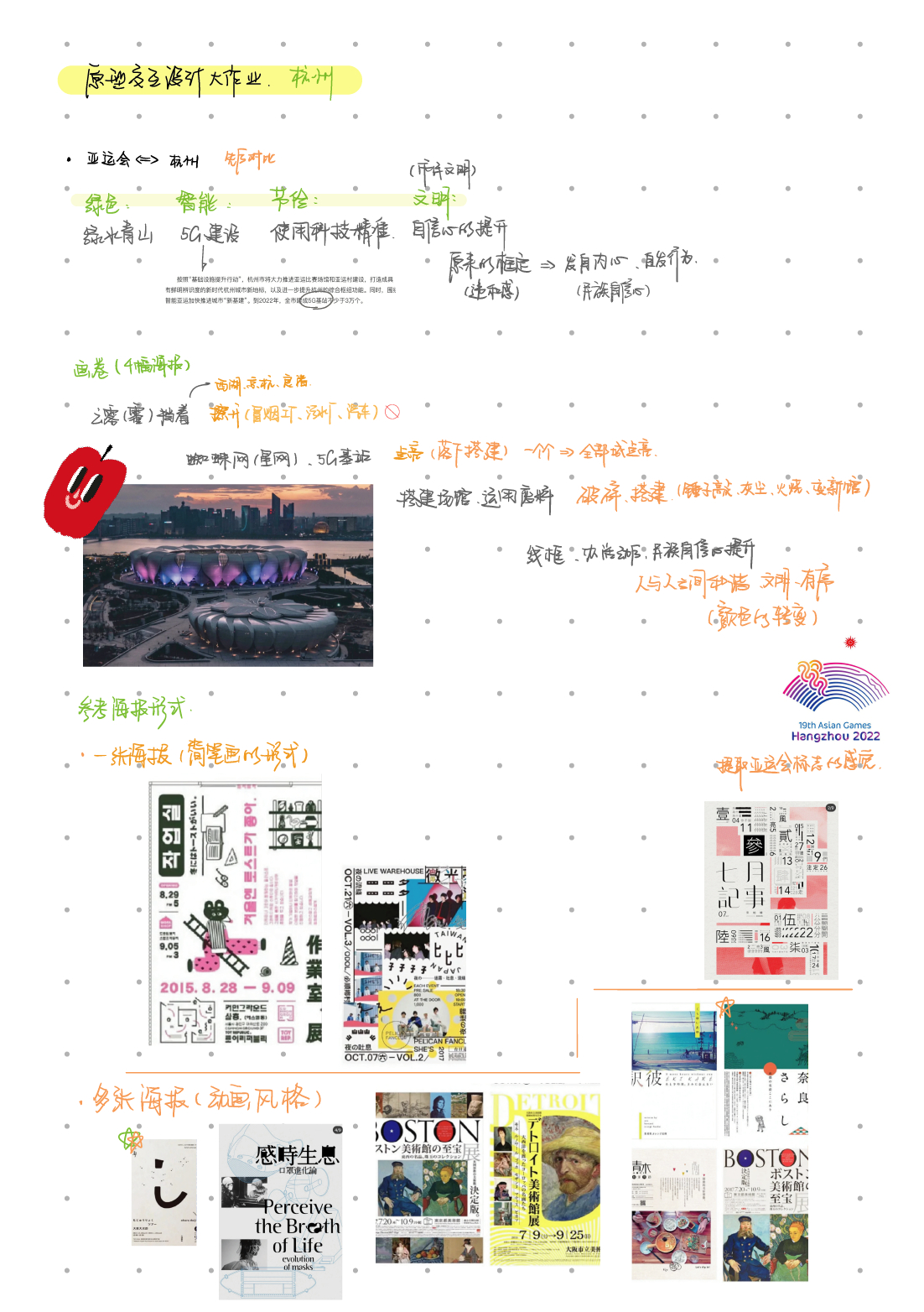
以下为我查找到的资料

以下为我思考时的手稿
Yi6We1.png

我的设计

我选择的是亚运会的主题,
想要从亚运会的四个理念“绿色、智能、文明、节俭”出发,
以交互式海报的形式,
表达出杭州与亚运会的关系。
杭州为亚运会所作出的建设其实反过来也相当于是亚运会给杭州带来的。

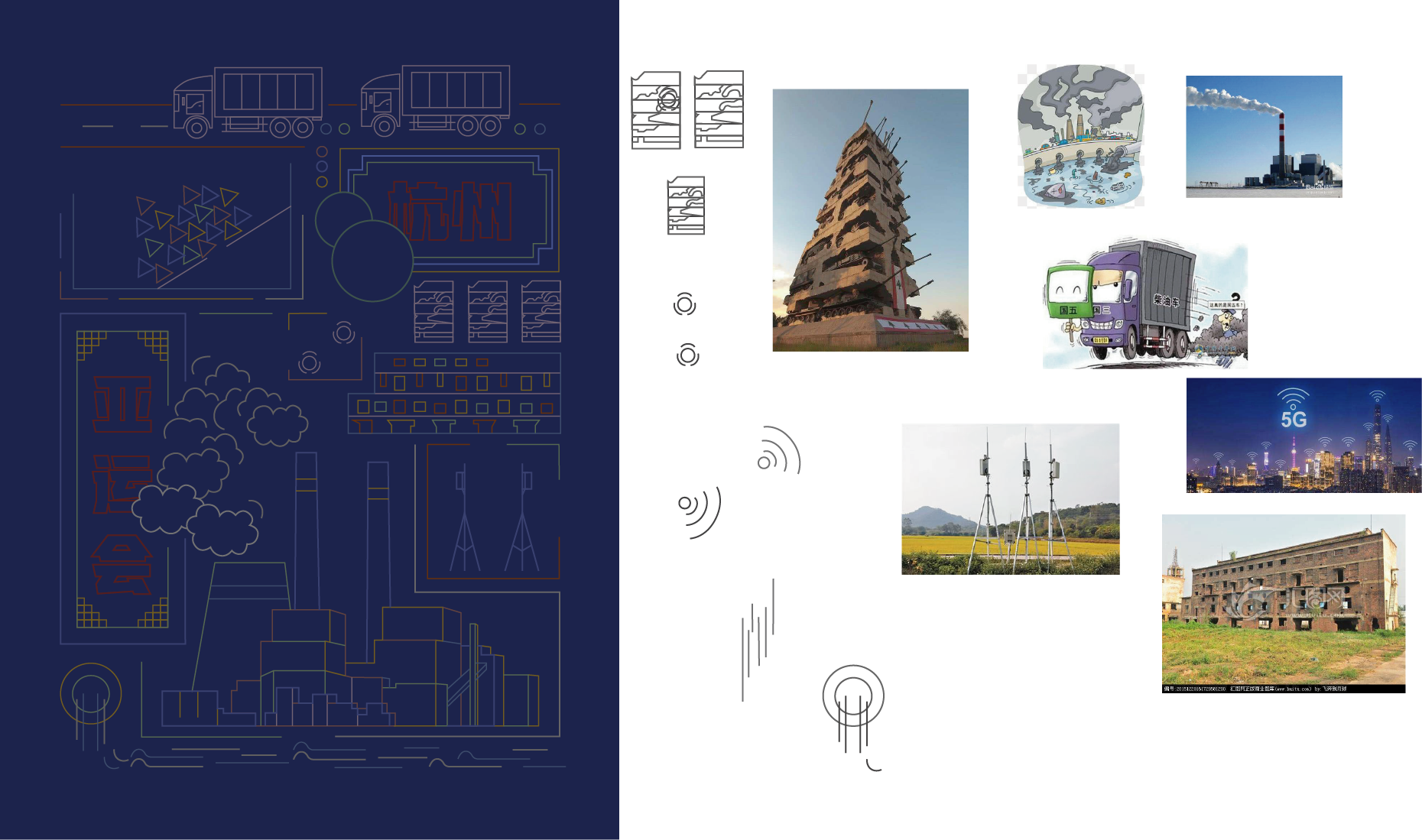
在海报中的交互形式是我们身为建筑者所做一些符合亚运会理念“绿色、智能、节俭”的事,拆除污染源和智能化建设以及利用废弃建筑材料制造混合物来建造亚运会场馆。
当我们完成所有的建设之后,就会发现杭州发生了巨大的变化,通过对比深化我想表达的主题思想,亚运会为杭州带来了活力文明绿色智能。

细节思考:

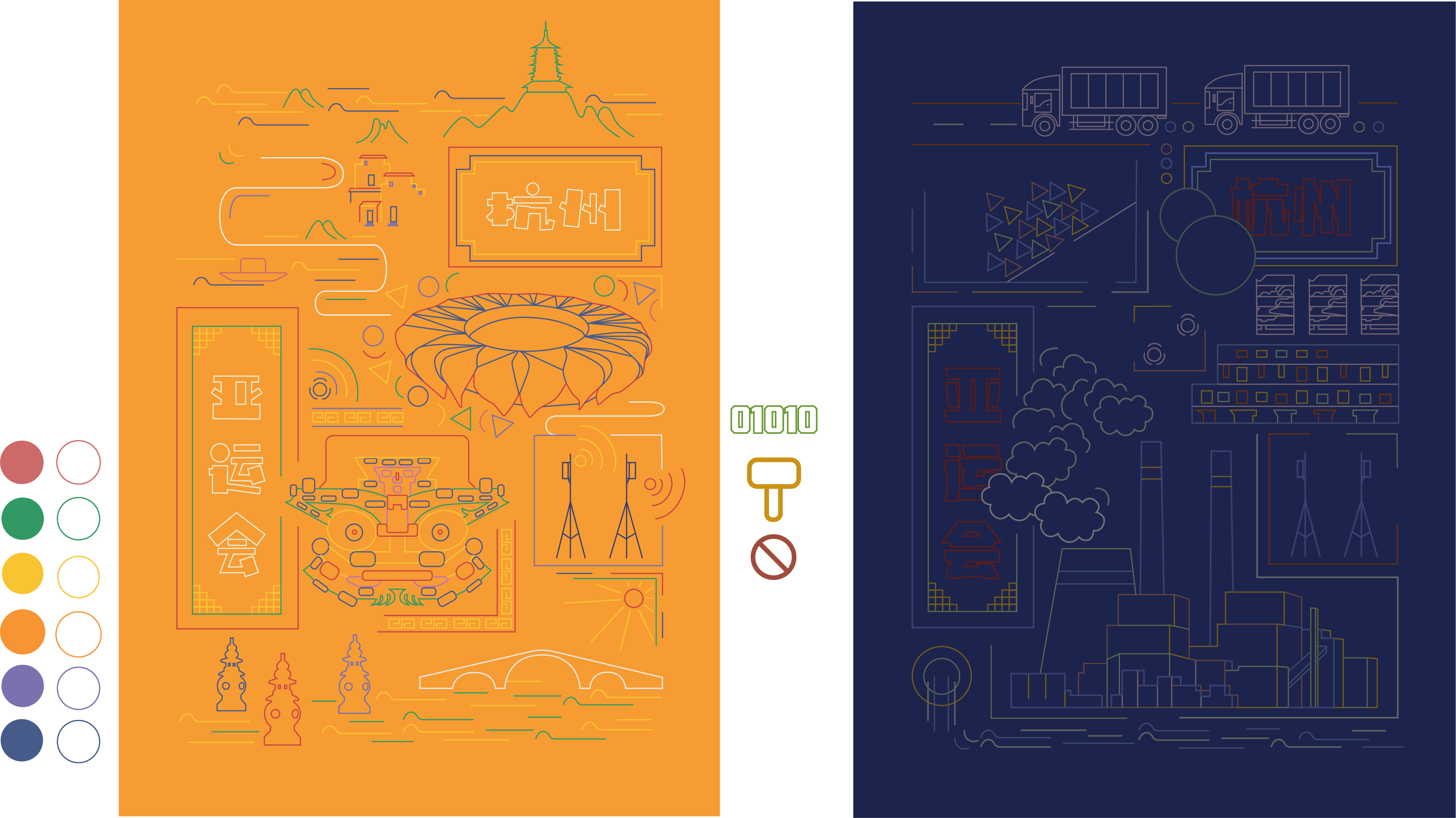
  • 两张海报我各选用了紫色和橙色的对比色,因为我觉得暗紫色有一种压抑沉闷之感,而橙色却彰显活力。
  • 在亚运会的理念“文明”方面,我觉得一个是在于人的文明,还有一个则是历史文明。
    首先我觉得承办亚运会等世界级的盛事,给那所城市的人内心的民族自信心会提升很多,从而变得文明。在前一张海报中一群人在无形的框中乱撞,哪怕有枷锁,却还是很乱,给整体带来混乱感。而后一张人们井然有序已经成为了美化美化城市的一部分了。
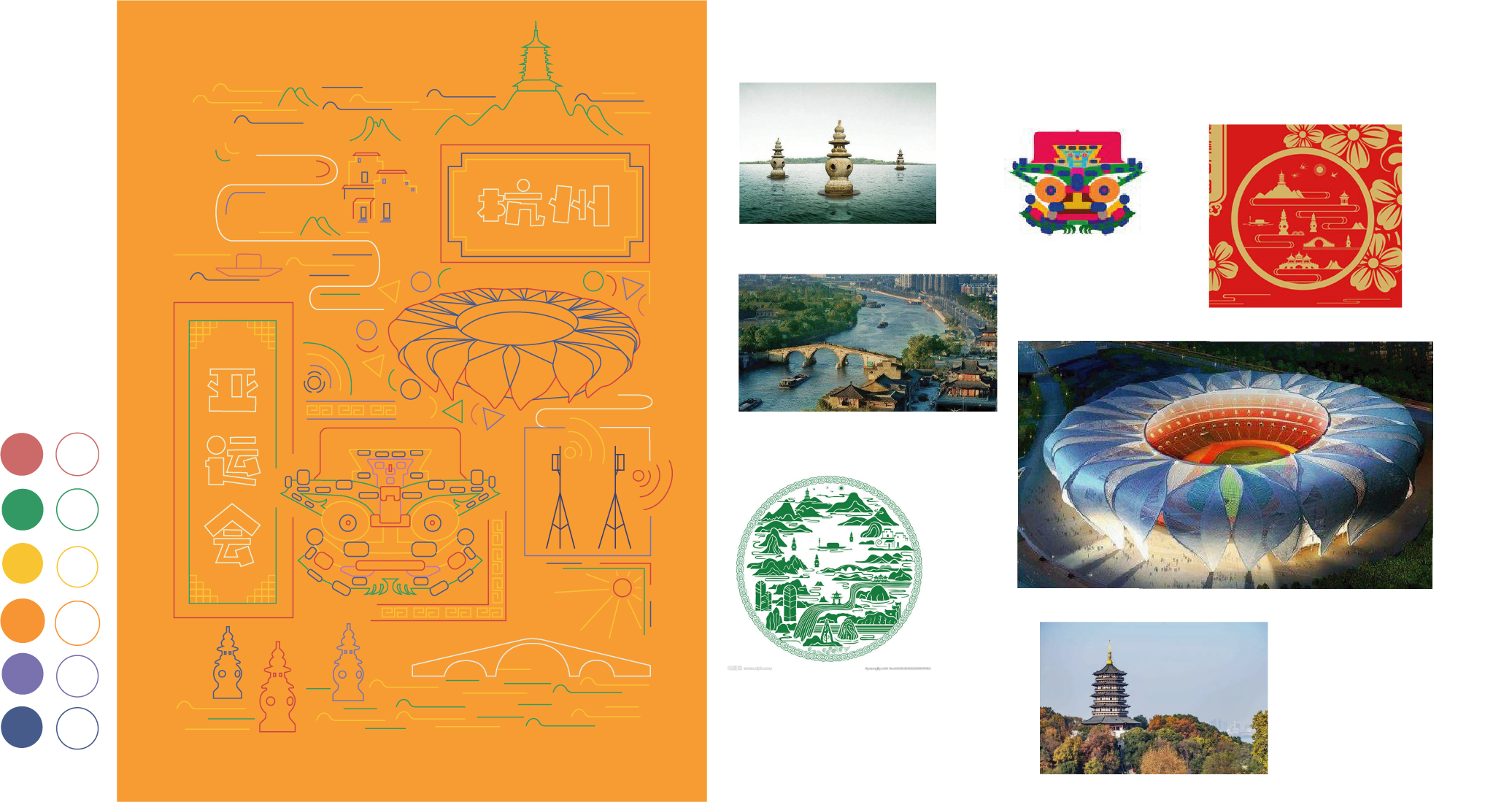
    在历史文明方面,我觉得将污染破坏源解决,反过来便会使得我们的文化历史完善的保存,所以在后一张海报中我加入了杭州的特色历史文化——良渚文化元素。
  • “绿色”方面,我想到了习近平总书记的“绿水青山就是金山银山”当我们解决掉了污染源后,一些青山绿水自然人文景观便显露了出来。
  • “节俭”方面,以海报中用锤子将原来的废楼打碎变成线,然后又“建造”出亚运会来体现。
过程以及ai初稿展示

海报1的设计思路(参考图片)
Yi2VRU.png
海报2的设计思路(参考图片)
Yi2PZn.png
ai初稿对比图展示
YiXK3Q.png

成果展示

成果请看: http://zstu-interaction.art/?p=3525

代码分享
1
2
3
4
5
6
7
8
9
10
11
12
13
14
15
16
17
18
19
20
21
22
23
24
25
26
27
28
29
30
31
32
33
34
35
36
37
38
39
40
41
42
43
44
45
46
47
48
49
50
51
52
53
54
55
56
57
58
59
60
61
62
63
64
65
66
67
68
69
70
71
72
73
74
75
76
77
78
79
80
81
82
83
84
85
86
87
88
89
90
91
92
93
94
95
96
97
98
99
100
101
102
103
104
105
106
107
108
109
110
111
112
113
114
115
116
117
118
119
120
121
122
123
124
125
126
127
128
129
130
131
132
133
134
135
136
137
138
139
140
141
142
143
144
145
146
147
148
149
150
151
152
153
154
155
156
157
158
159
160
161
162
163
164
165
166
167
168
169
170
171
172
173
174
175
176
177
178
179
180
181
182
183
184
185
186
187
188
189
190
191
192
193
194
195
196
197
198
199
200
201
202
203
204
205
206
207
208
209
210
211
212
213
214
215
216
217
218
219
220
221
222
223
224
225
226
227
228
229
230
231
232
233
234
235
236
237
238
239
240
241
242
243
244
245
246
247
248
249
250
251
252
253
254
255
256
257
258
259
260
261
262
263
264
265
266
267
268
269
270
271
272
273
274
275
276
277
278
279
280
281
282
283
284
285
286
287
288
289
290
291
292
293
294
295
296
297
298
299
300
301
302
303
304
305
306
307
308
309
310
311
312
313
314
315
316
317
318
319
320
321
322
323
324
325
326
327
328
329
330
331
332
333
334
335
336
337
338
339
340
341
342
343
344
345
346
347
348
349
350
351
352
353
354
355
356
357
358
359
360
361
362
363
364
365
366
367
368
369
370
371
372
373
374
375
376
377
378
379
380
381
382
383
384
385
386
387
388
389
390
391
392
393
394
395
396
397
398
399
400
401
402
403
404
405
406
407
408
409
410
411
412
let img1
let img2
let img3
let img4
let img5
let img6
let imgg1
let imgg2
let imgg3
let press
let changguan
let wifiImg
let a = 100
let b = 270
let y = []
let x = []
let e = 420
let f = 120
let speedCar = -0.5
let speed1 = -0.5
let speed2 = -0.3
let speed3 = -0.2
let speed4 = 0.3
let speedx
let speedy
let line1, line2, line3, line4, line5
let clouds
let turn = []
let turn1 = []
let triangles = []
var hit1 = false
var hit2 = false
var hit3 = false
var hit4 = false
var hit5 = false
var hitCircle = false
let CG = false
let rects = [];
let r
const n = 20
let agrid
let yx
let yy
var still = false
let still2 = false
let still3 = false
let still4 = false
let chuizi = false
let jinzhi = false
let wifi = false
let wifion = false
let move = true
let jinzhiON = []
let lineX = 291
let lineY = 260
let lineYY = []
let lineYY2 = []
let mousex, mousey
let img7
let img8
let img9
let img10
let img11
let g = 100
let g2 = 604
let h = 220
let success=0

const colors = [
"#1B234C", //底色
"#60413E", //红色
"#55684E", //绿色
"#725D1C", //黄色
"#394070", //紫色
]
const grid = 20 //颜色固定

function preload() {
//前一张的图片加载
img1 = loadImage("./imgs/456.png")
img2 = loadImage("./imgs/123.png")
img3 = loadImage("./imgs/123.png")
img5 = loadImage("./imgs/2.png")
img6 = loadImage("./imgs/zhe.png")
imgg1 = loadImage("./imgs/gongju1.png")
imgg2 = loadImage("./imgs/gongju2.png")
imgg3 = loadImage("./imgs/gongju3.png")
press = loadImage("./imgs/zheda.png")
clouds = loadImage("./imgs/1.png")
changguan = loadImage("./imgs/changguan.png")
wifiImg = loadImage("./imgs/wifi.png")


//后一张图片加载
img7 = loadImage("./imgs/beijing2.png")
img8 = loadImage("./imgs/21.png")
img9 = loadImage("./imgs/22.png")
img10 = loadImage("./imgs/zhe2.png")
img11 = loadImage("./imgs/23.png")
}

class rectangle {
//构造人函数
constructor(x, y, r, i) {
this.x = x;
this.y = y;
this.r = r;
this.i = i
this.angle = 1;
//相当于定义x方向上的speed
this.yx = cos(TAU / n * i) * (r) / 50;
//相当于定义y方向上的speed
this.yy = sin(TAU / n * i) * (r) / 50;
this.turn = 0
}
translating() {
//检测人撞击边线,每撞击一次turn+1
if (hit1 || hit2 || hit3 || hit4 || hit5) {
this.turn += 1
}
//turn为单数时,人改变方向
if (this.turn % 2 != 0) {
this.yx = -this.yx
this.yy = -this.yy
this.x += this.yx
this.y += this.yy
}
//turn为双数时,原方向前进
else if (this.turn % 2 == 0) {
this.x += this.yx
this.y += this.yy
}

}
//定义方法rotating
rotating() {
rotate(this.angle);
this.angle += 1;
}
//定义方法display
display() {
fill("#1B234C")
stroke("#55684E");
strokeWeight(1);
ellipse(this.x, this.y, 10, 10);
}
}

function setup() {
createCanvas(700, 700)
//弹出框
Notiflix.Confirm.Show('前方高能', '提供三个工具,请拖动它们完成建设', '开始', '不了', function() { // Yes button callback
alert('工具箱🧰:锤子🔨 禁止🚫 代码01010');
},
function() { // No button callback
alert('怂什么?');
});

//定义云单初始位置和turn初始为0
for (var i = 0; i < 8; i++) {
x[i] = 140 + 5 * (8 - i)
y[i] = 420 - 8 * i
turn[i] = 0
}

agrid = TAU / n
for (let i = 0; i < n; i++) {
r = 20
//定义人的初始位置
let x = cos(agrid * i) * r + 120
let y = sin(agrid * i) * r + 180
rects.push(new rectangle(x, y, r, i));
rects[i].display()
}

for (let i = 0; i < 3; i++) {
jinzhiON[i] = false
}

}

function draw() {
background(255)
//加speed移动,并超出范围回到原点
a += speedCar
b += speedCar
e += speed2
f -= speed2
if (a < -100) {
a = 480
}
if (b < -100) {
b = 480
}
if (e < 200) {
e = 470
}
if (f > 470) {
f = 120
}
//画图
image(img1, 0, 0, 518, 700)
image(img2, a, 62, 150, 60)
image(img3, b, 62, 150, 60)
image(img5, f, 620, 342, 21)
image(img5, f - 350, 620, 342, 21)
//画遮住的图
image(img6, 0, 0, 518, 700)
//云移动
for (var i = 0; i < 8; i++) {
//move可执行的状态
if (move) {
//超出上面,回到原点
if (y[i] < 270) {
y[i] = 420
x[i] = 180
}
//超出左右,turn+1
if (x[i] <= 140 || x[i] >= 200) {
turn[i]++
}
//turn为双数时,x向左移动,y向上
if (turn[i] % 2 == 0) {
speedx = -0.08 * (8 - i)
x[i] += speedx
speedy = -0.05 * i
y[i] += speedy
}
//turn为单数时,x向右移动,y向上
else {
speedx = 0.08 * (8 - i)
x[i] += speedx
speedy = -0.05 * i
y[i] += speedy
}
}
//画云
image(clouds, x[i], y[i], 57, 42)
}

//画方形遮住
stroke(255)
fill(255)
rect(518, 0, 200, 700)
//画工具图
image(imgg1, 535, 200, 72.3, 33.9)
image(imgg2, 550, 250, 44.1, 52.2)
image(imgg3, 555, 320, 37.2, 37.2)
//点击并拖动工具
if (mouseIsPressed) {
//dist为两点之间距离
if (dist(mouseX, mouseY, 550, 210) < 20) wifi = true
if (dist(mouseX, mouseY, 550, 290) < 20) chuizi = true
if (dist(mouseX, mouseY, 550, 350) < 30) jinzhi = true
//拖动锤子图片
if (chuizi) {
image(imgg2, mouseX, mouseY, 44.1, 52.2)
still2 = true
mousex = mouseX
mousey = mouseY
}
//拖动wifi图片
if (wifi) {
image(imgg1, mouseX, mouseY, 72.3, 33.9)
still3 = true
mousex = mouseX
mousey = mouseY
}
//拖动禁止图片
if (jinzhi) {
image(imgg3, mouseX, mouseY, 37.2, 37.2)
still4 = true
mousex = mouseX
mousey = mouseY
}

}
//锤子工具
if (!mouseIsPressed && still2) {
chuizi = false
if (mousex < 460 && mousex > 310 && mousey < 350 && mousey > 240) {
//遮住废楼部分
image(press, 287, 230, 187, 140.8)
//画线
for (var i = 0; i < 10; i++) {
let speeddown = 0.01 * (i + 1)
lineY += speeddown
lineX = 320 + i * 5
lineYY[i] = lineY + 6 * i
lineYY2[i] = lineY + 6 * (10 - i)
if (lineYY[i] > 360 || lineYY2[i] > 360) {
lineYY[i] = 360
lineYY2[i] = 360
lineX = 295 + i * 6
// CG=true
}
stroke("#725D1C")
noFill()
line(lineX, lineYY[i], lineX + 120, lineYY[i])
line(lineX, lineYY2[i], lineX + 80, lineYY2[i])
}
}
}
//每一根直线落下,m+1,m为10时,改变cg状态
let m = 0
for (var i = 0; i < 10; i++) {
if (lineYY[i] == 360 && lineYY2[i] == 360) {
m++
}
if (m == 10){
CG = true
}

}
//cg为true时,画遮挡图以及亚运会场馆
if (CG) {
image(press, 287, 230, 187, 140.8)
image(changguan, 320, 250, 150, 90)
}


//wifi工具
if (!mouseIsPressed && still3) {
wifi = false
if (mousex < 460 && mousex > 370 && mousey < 500 && mousey > 360) {
wifion = true
}
}
if (wifion) {
image(wifiImg, 392, 365, 89.7, 76.2)
}

//禁止工具
if (!mouseIsPressed && still4) {
jinzhi = false
if (mousex < 90 && mousex > 40 && mousey < 600 && mousey > 540) {
jinzhiON[0] = true
}
if (mousex < 250 && mousex > 150 && mousey < 460 && mousey > 360) {
jinzhiON[1] = true
}
if (mousex < 500 && mousex > 50 && mousey < 100 && mousey > 70) {
jinzhiON[2] = true
}
}
if (jinzhiON[0]) {
image(imgg3, 56, 560, 37.2, 37.2)
}
//云不动
if (jinzhiON[1]) {
image(imgg3, 190, 440, 37.2, 37.2)
move = false
}
//车停止
if (jinzhiON[2]) {
image(imgg3, 260, 80, 37.2, 37.2)
speedCar = 0
}

//画无形的五根线
stroke("#1B234C")
line(65, 140, 235, 140)
line(65, 140, 65, 235)
line(65, 235, 140, 235)
line(140, 235, 235, 180)
line(235, 180, 235, 140)
noFill()
stroke("#55684E")
for (let i = 0; i < n; i++) {
//人与无形的线的撞击检测
hit1 = collideLineCircle(65, 140, 235, 140, rects[i].x, rects[i].y, 10);
hit2 = collideLineCircle(65, 140, 65, 235, rects[i].x, rects[i].y, 10);
hit3 = collideLineCircle(65, 235, 140, 235, rects[i].x, rects[i].y, 10);
hit4 = collideLineCircle(140, 235, 235, 180, rects[i].x, rects[i].y, 10);
hit5 = collideLineCircle(235, 180, 235, 140, rects[i].x, rects[i].y, 10);
//移动
rects[i].translating()
rects[i].display()
}
//当任务完成后,执行后一张海报
if (CG&&wifion&&jinzhiON[0]&&jinzhiON[1]&&jinzhiON[2]) {
g += speed1
if (g < -504) {
g = 504
}
g2 += speed1
if (g2 < -504) {
g2 = 504
}
h += speed4
if (h < 210 || h > 230) {
speed4 = -speed4
}
image(img7, 0, 0, 518, 700)
image(img8, g, 75, 504, 33)
image(img8, g2, 80, 504, 33)
image(img8, g + 100, 215, 504, 33)
image(img8, g2 + 100, 215, 504, 33)
image(img9, g, 585, 504, 55)
image(img9, g2, 585, 504, 55)
image(img10, 0, 0, 518, 700)
image(img11, 100, h, 59.1, 20.7)
stroke(255)
fill(255)
rect(518, 0, 200, 700)
success++
}

if(success==1){
Notiflix.Report.Success( '建设成功!', '"你真是一个平平无奇建筑🏠小天才" ', '观看活力杭州' );
}
}
  • 首先,两辆车是各加一个speed运动,小于值回到原点,然后两端用图覆盖住。水流也是一样的原理,为了体现水流的一直向前流的感觉,我也分开用了两次图。
  • 代表人的圆的碰撞是运用了检测线与圆碰撞的库,线用了底色画,所以看起来是无形的。建立了数组和类,设定每个圆的相应属性和x方向的speed(yx)和y方向的speed(yy)和turn,在setup函数上画出初始位置,在draw函数中不停加运用方法移动。起初是向四周运动,当撞击到五条线之一时,turn加一,如果turn为单数,改变方向,如果为双数按原方向移动。
  • 云朵运用了一个数组循环,在setup中定义每个云初始位置和每个云turn初始为0,在draw函数中,超出左右则turn加一,turn为双数向左移,为单数向右移,总体一直向上,超过上端回到原点。通过i循环来改变每个i的speed,每个云就产生了变化。
  • 运用判断语句,鼠标点击的情况下,离图片点的距离小于一个范围就执行在鼠标旁画图,以体现拖动,并改变相应still的状态。在鼠标点击过松开的状态下(still状态改变并且鼠标未点击)并且鼠标在相应范围内:锤子部分,先画图遮住废弃楼再用数组循环画线,并且相应直线的y坐标超过360时,相应直线y坐标固定在360并且用m计数加一,产生一个个下落的感觉,m为10时将改变CG状态,CG可执行时,画遮挡图和亚运会场馆;wifi部分,同样原理,拖动松开后画wifi图片;禁止的部分,同样原理,相应画三个静止图片,并且改变云的move状态使云停止,车的移动速度为0。
  • 每次拖动相应图片并松开到相应位置后会有相应一个状态改变,当这些五个状态都改变后,运行后一张海报的代码。
  • 因为后一张海报处于不断刷新中,于是添加success计数,只有在等于1时可以弹出对话框。

课程感悟

关于p5.js的学习

感想:在这次p5.js的学习中,我比较倾向于做那种简约的几何图形变化,在游戏与开头的海报中都有体现出,但是感觉并没有想象中酷炫的样子,而且可能因为太抽象,也会有一些问题。于是我在这次大作业中依旧是选取简单几何感的风格,但是并不是完全抽象,通过观察图片来提取了形象,也好好想了它的交互形式,想做出那种合理又为原来静态海报添加美感的动态。
建议:更偏向于小组合作,可以更深入进行。

关于个人网站的学习

我觉得建立个人网站还挺快乐的,尤其是我在写韩国游记的时候觉得真的很治愈,可以把自己喜欢的分享给大家哈哈哈哈哈😊

项目分享|儿童防性侵立体交互绘本